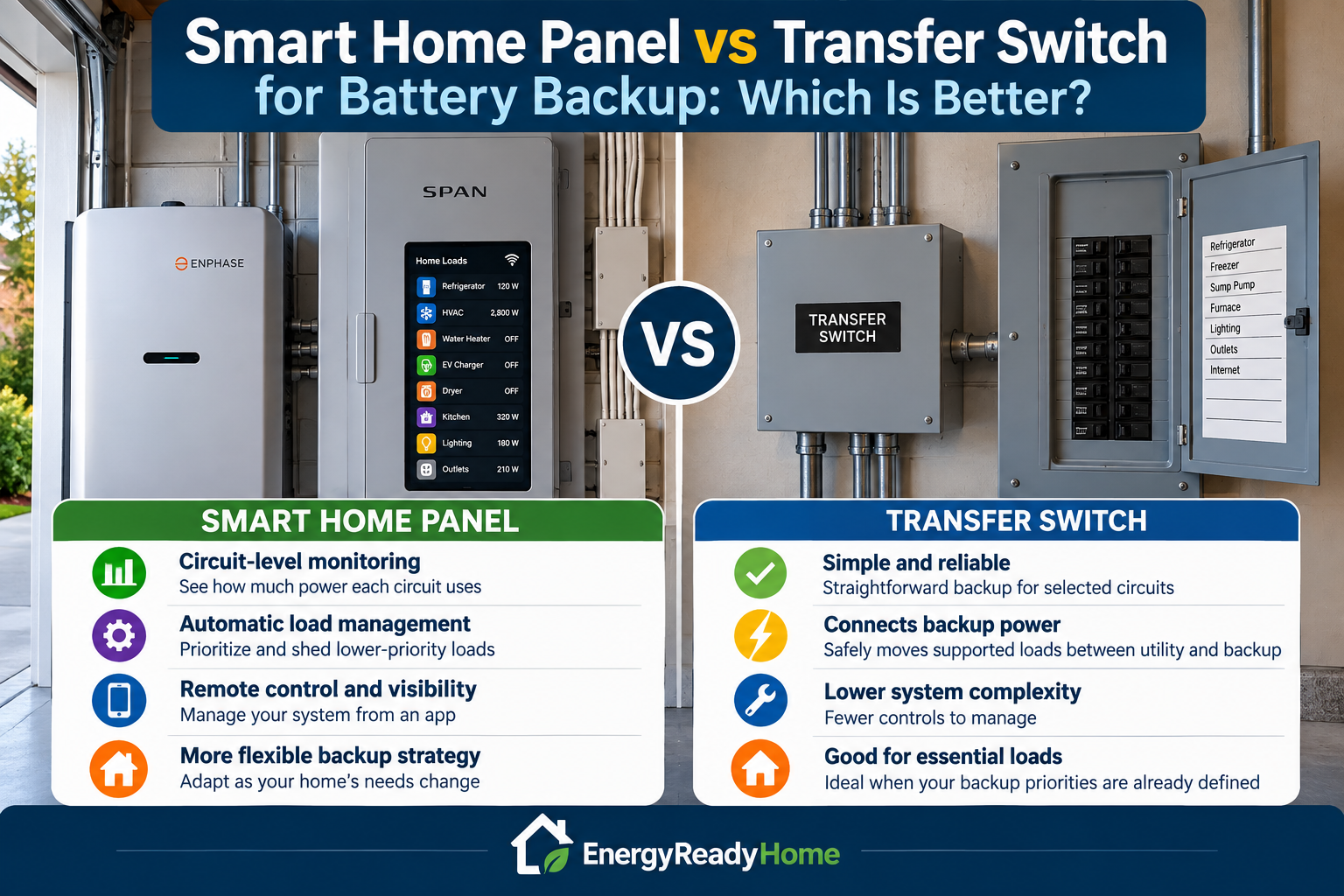
For most homeowners, the choice between a smart home panel and a conventional transfer switch comes down to how much control you want over your backup power. A transfer-switch approach can provide a simpler way to connect backup power to selected household circuits, while a smart electrical panel or advanced load-management system can add circuit-level monitoring, automated load control, and more flexible management of limited battery power.
If your primary goal is simply to keep a predictable group of essential circuits operating during an outage, a conventional transfer-switch configuration may be sufficient. If you want the system to actively decide which loads remain powered, shed lower-priority loads, monitor circuit consumption, or adapt as battery conditions change, a smart-panel approach may offer important advantages.
Neither approach creates additional battery capacity. The battery still determines how much stored energy is available, and the inverter still determines how much electrical power the system can deliver. The panel or transfer equipment determines how that available backup power is connected to and managed across the home.
Quick Answer: Smart Home Panel or Transfer Switch?
| If Your Priority Is… | Approach to Consider |
|---|---|
| Simple backup for predetermined essential circuits | Transfer switch |
| Lower system complexity | Transfer switch |
| Manual control over which supported loads you use | Transfer switch |
| Circuit-level energy monitoring | Smart home panel |
| Automatic load shedding or prioritization | Smart home panel |
| More flexible management of limited battery capacity | Smart home panel |
| Advanced solar, battery, or home-energy integration | Smart home panel may provide additional capabilities |
The exact capabilities depend on the specific equipment and system design. “Smart panel” is a broad category, and not every product provides the same monitoring, switching, automation, or backup-power functions.
What Does a Transfer Switch Do?
A transfer switch provides a controlled method for moving supported electrical loads between the normal utility source and a backup power source.
In a battery-backup installation, the basic concept is:
Utility power → transfer equipment → household circuits
When backup power is needed, the supported circuits are supplied from the compatible battery/inverter system instead of the utility grid.
This separation is important because a backup system must be properly configured so that it does not unintentionally energize utility lines during an outage. The U.S. Department of Energy describes properly configured solar-plus-storage systems as capable of detecting loss of grid power and operating in an isolated or “islanded” mode during an outage. DOE guidance on solar, battery storage, and electrical resilience explains how storage and appropriate system configuration can maintain power when the grid is unavailable.
A conventional transfer-switch arrangement can work particularly well when the homeowner already knows exactly which circuits should receive backup power.
Examples might include:
- Refrigerator and freezer
- Sump pump
- Well pump, when the backup system supports it
- Furnace or heating-system controls
- Internet equipment
- Selected lighting circuits
- Selected receptacle circuits
- Other essential household equipment
The important limitation is that a transfer switch does not increase the capability of the battery.
If the battery inverter can continuously supply 4,000 watts, connecting it to a transfer switch does not turn it into a 6,000-watt system. Likewise, connecting more circuits does not increase the battery’s stored energy.
What Is a Smart Home Panel?
A smart home panel adds digital monitoring and control capabilities to the home’s electrical system. Depending on the product and installation, it may be able to monitor individual circuits, control selected loads, prioritize backup circuits, or automatically disconnect lower-priority loads when available backup power is limited.
This creates a fundamentally different approach to outage management.
Instead of deciding permanently that:
These circuits are backed up and those circuits are not,
a compatible smart system may allow a more dynamic strategy:
These loads have first priority, these loads can operate when sufficient power is available, and these lower-priority loads can be temporarily disabled when necessary.
That flexibility can become valuable as homes add larger electrical loads such as heat pumps, central air conditioning, electric water heating, and EV charging.
The Biggest Difference: Fixed Circuits vs Active Load Management
Consider a homeowner who wants backup power for:
- Refrigerator
- Freezer
- Sump pump
- Internet
- Lighting
- Central air conditioning
A conventional essential-load strategy might place selected circuits on the backup system and require the homeowner to make sure the total electrical demand remains within the battery system’s limits.
A compatible smart-panel or advanced load-management system may provide another option: monitor or control individual loads so that the system can prioritize the most important equipment.
For example, the backup strategy could conceptually prioritize:
- Refrigeration
- Sump pump
- Internet and essential electronics
- Lighting
- HVAC when sufficient battery power is available
- Lower-priority discretionary loads last
The specific automation available depends on the equipment. But the principle is important: smart load management can help homeowners use finite battery power more deliberately.
Smart Panel vs Transfer Switch at a Glance
| Feature | Conventional Transfer Switch Approach | Smart Home Panel Approach |
|---|---|---|
| Connects backup power to household circuits | Yes, when properly configured | Yes, with compatible equipment |
| Grid isolation / transfer function | Core function of appropriate transfer equipment | May be integrated or require compatible system equipment |
| Circuit-level monitoring | Usually limited or separate | Common smart-panel capability |
| Remote/app visibility | Usually limited or separate | Often available |
| Automated load prioritization | Usually limited without additional controls | May be available |
| Automatic load shedding | Requires appropriate additional controls | May be integrated |
| System complexity | Generally simpler | Generally more sophisticated |
| Best fit | Predictable essential-load backup | Dynamic home-energy and backup management |
EnergyReadyHome comparison. Capabilities vary significantly by manufacturer, product, battery platform, and installation design.
Why Load Management Matters With Home Batteries
Battery backup involves two different constraints:
- Power: How much electrical demand the system can support at one time.
- Energy: How long the stored battery capacity can support those loads.
Load management can help with both.
Reducing simultaneous loads can keep household demand below the battery inverter’s available output. Turning off unnecessary equipment can also reduce energy consumption and extend potential outage runtime.
For example, a home might normally use an electric dryer, range, EV charger, water heater, central air conditioner, and other equipment without much thought when utility power is available.
During a battery-backed outage, operating several high-demand loads simultaneously could exceed the backup system’s capabilities or rapidly consume stored energy.
A conventional transfer-switch strategy addresses this partly by limiting which circuits receive backup power. A smart-panel strategy may instead provide greater flexibility in determining which supported loads are allowed to operate at a particular time.
EnergyReadyHome Example: Managing a Limited Battery System
Consider a hypothetical battery system capable of supplying 7 kW of continuous power.
| Load | Illustrative Operating Demand | Priority |
|---|---|---|
| Refrigerator | 150 W | High |
| Sump pump | 800 W | High |
| Internet and networking | 30 W | High |
| Essential lighting | 100 W | High |
| Central air conditioning | 3,000 W | Medium/High |
| Electric dryer | 5,000 W | Low during outage |
These are illustrative values for explaining load-management strategy, not specifications for a particular home or appliance. Actual running and startup requirements should be determined from the equipment being backed up.
If the dryer and air conditioner attempted to operate alongside the essential loads, the hypothetical system could exceed its 7 kW continuous-output limit.
A conventional backup design could solve this by excluding the dryer circuit entirely.
A compatible smart load-management system could potentially take a more flexible approach by keeping the dryer unavailable while higher-priority loads are operating, then allowing it only when system conditions permit.
That does not make the battery larger. It makes the available battery power more actively managed.
When a Conventional Transfer Switch Makes More Sense
A smart panel is not automatically the better choice simply because it offers more technology.
For many homeowners, a conventional transfer-switch approach can provide exactly what is needed: a safe, straightforward method for supplying backup power to a predetermined group of household circuits.
A transfer-switch approach may make more sense when:
- Your backup priorities are already clearly defined.
- You primarily want to power essential circuits during an outage.
- You do not need circuit-by-circuit energy monitoring.
- You are comfortable manually limiting discretionary loads.
- You want to minimize system complexity.
- Your battery or backup-power platform already supports an appropriate transfer solution.
Consider a homeowner whose outage plan consists of a refrigerator, freezer, sump pump, furnace controls, internet equipment, several lights, and selected outlets.
If those loads fit comfortably within the battery system’s power and energy limits, sophisticated automatic load management may provide relatively little additional benefit.
In that situation, simplicity can be an advantage.
When a Smart Home Panel May Be Worth It
A smart-panel or advanced load-management approach becomes more compelling as the backup plan becomes more complex.
It may be worth considering when:
- You want visibility into individual circuit consumption.
- You want to change backup priorities without relying entirely on fixed circuit assignments.
- You expect to manage several large electrical loads.
- You want automatic load shedding or prioritization where supported.
- You want greater control over how battery capacity is used during an outage.
- You are building a broader home-energy system involving batteries, solar, or other compatible equipment.
- You expect your home’s electrical requirements to change over time.
The last point can be especially important.
A homeowner may initially want backup for refrigeration, lighting, internet, and a sump pump. Several years later, that same home might have a heat pump, electric vehicle, additional battery capacity, or expanded solar.
A more flexible load-management architecture may make it easier to adapt the home’s backup strategy as those requirements change.
Does a Smart Panel Make a Smaller Battery Perform Like a Larger One?
No.
A smart panel cannot increase battery capacity or inverter output.
What it can potentially do is help you use the available capacity and output more strategically.
Imagine two homes with identical batteries.
Home A allows every backed-up load to operate whenever someone turns it on.
Home B prioritizes essential equipment and restricts discretionary loads when battery reserves become more important.
Home B does not have more stored energy. But its backup strategy may preserve that stored energy for higher-priority uses.
This distinction is central to understanding smart load management:
Battery capacity determines the energy available. Load management determines how deliberately you use it.
What About Automatic Backup?
Automatic backup and smart load management are related, but they are not the same thing.
A properly designed battery-backup system may provide automatic transfer when utility power fails without requiring a smart electrical panel.
Likewise, simply installing equipment marketed as a smart panel does not mean every battery, circuit, or household load will automatically work during an outage.
The complete system has to be evaluated, including:
- Battery system
- Inverter output
- Transfer/isolation equipment
- Electrical-panel configuration
- Supported circuits
- Load-control capabilities
- Manufacturer compatibility
- Installation requirements
Homeowners should therefore compare complete system architectures rather than assuming that “smart” automatically means “automatic backup.”
What About 120V and 240V Loads?
This is another area where the backup-power source matters more than the panel alone.
Many common household circuits operate at 120 volts, while larger equipment may require 240 volts.
Examples of potential 240V loads include:
- Central air conditioning
- Heat pumps
- Well pumps
- Electric water heaters
- Electric ranges
- Clothes dryers
- EV charging equipment
A smart panel cannot make a 120V-only backup source operate a 240V appliance.
The battery/inverter system, transfer equipment, electrical configuration, and supported loads all have to be compatible.
This is why homeowners planning to back up major 240V equipment should evaluate the entire electrical system rather than choosing the panel first.
Smart Panels Can Be Especially Useful With Large Loads
Large electrical loads create one of the strongest cases for active load management.
Suppose a battery system can support central air conditioning but cannot comfortably operate the air conditioner, electric water heater, dryer, and EV charger simultaneously.
One solution is simply to exclude most of those loads from backup.
Another approach, when supported by compatible equipment, is to make some loads controllable.
A backup strategy might prioritize:
- Essential household loads
- HVAC
- Water heating when adequate capacity is available
- Other discretionary loads only when system conditions permit
This can make a whole-home-connected battery system more practical without pretending that every appliance can operate simultaneously during an outage.
Cost: Don’t Compare the Panel Alone
The cost comparison should be based on the complete installed backup architecture, not simply the retail price of one piece of equipment.
A transfer-switch system may require:
- Transfer equipment
- Electrical installation
- Panel modifications
- Inlet or connection equipment where applicable
- Compatible battery/inverter equipment
A smart-panel installation may involve:
- Smart electrical equipment
- Professional installation
- Battery-system integration
- Communication or control equipment
- Additional load-control hardware depending on the design
The least expensive hardware option is not necessarily the least expensive completed installation.
Before choosing either approach, homeowners should obtain an installation proposal that identifies exactly what equipment is included, which circuits will receive backup power, what loads can be controlled, and what the complete installed system will cost.
Reliability and Complexity
A conventional transfer-switch strategy has an intuitive advantage: simplicity.
Fewer monitoring and automation features can mean fewer features that need configuration or interaction.
A smart-panel strategy trades some of that simplicity for additional information and control.
That does not inherently make one approach more reliable than the other. Reliability depends on the specific equipment, system design, installation quality, maintenance requirements, and manufacturer support.
But homeowners should ask themselves whether they actually intend to use the additional capabilities they are paying for.
If you simply want six essential circuits backed up during occasional outages, extensive circuit-level automation may be unnecessary.
If you are trying to coordinate a large battery, solar, HVAC, EV charging, and other substantial loads, the additional control may be considerably more useful.
EnergyReadyHome Decision Matrix
| Homeowner Situation | Approach to Consider | Why |
|---|---|---|
| Small group of fixed essential loads | Transfer switch | Simple backup strategy with predictable circuits |
| Budget-conscious essential-load backup | Transfer switch | May avoid paying for advanced controls you do not need |
| Want circuit-level energy visibility | Smart panel | Monitoring can show where household electricity is being used |
| Multiple large electrical loads | Smart panel / load management | Active control may help manage competing loads |
| Want dynamic backup priorities | Smart panel | Compatible systems may provide more flexible circuit control |
| Simple outage plan that rarely changes | Transfer switch | Advanced automation may provide limited additional value |
| Expanding battery, solar, and electrification over time | Smart panel may be worth considering | Greater monitoring and control may support a more complex future system |
This EnergyReadyHome decision matrix is a planning framework rather than a substitute for an electrical-system design. Product capabilities and installation requirements vary.
Questions to Ask Before Choosing
Before selecting either architecture, answer these questions:
- Which circuits absolutely must operate during an outage?
- Which loads would be useful but are not essential?
- What are the continuous and startup-power requirements of those loads?
- Do any important loads require 240V power?
- Can the battery and inverter support those loads?
- Do you want to monitor individual circuits?
- Would automatic load shedding materially improve your backup plan?
- Do you expect to add solar, batteries, EV charging, heat pumps, or other large electrical loads?
- What is the complete installed cost of each approach?
- Which equipment is compatible with your chosen battery platform?
Those answers usually reveal whether advanced load management provides meaningful value or merely adds features you may rarely use.
Smart Home Panel vs Transfer Switch: Which Should You Choose?
Choose a conventional transfer-switch approach when your backup plan is straightforward: you have a known set of essential circuits, the battery is properly sized for them, and you do not need sophisticated circuit-level monitoring or automated load management.
Consider a smart home panel or advanced load-management system when your backup plan is more dynamic: you want greater visibility and control, need to coordinate larger electrical loads, or want the system to manage limited battery power more actively.
The most important principle is not to buy technology simply because it is more advanced.
Start with the loads you need to protect. Determine the battery capacity and power required to support them. Then decide how much monitoring, automation, and flexibility you actually need from the home’s electrical integration.
For a simple essential-load strategy, a transfer switch may be all you need.
For a more sophisticated home-energy system, a smart panel may provide capabilities that become increasingly valuable as the home becomes more electrified.
Frequently Asked Questions
Is a smart home panel the same as a transfer switch?
No. The terms describe different functions. Appropriate transfer equipment controls how backup power is isolated from and transferred relative to utility power. A smart panel adds monitoring and control capabilities, although some integrated systems may combine multiple functions. Always evaluate the specific equipment and system architecture.
Do I need a smart panel for home battery backup?
No. Many home battery systems can provide automatic or integrated backup using compatible transfer and electrical equipment without requiring a smart electrical panel. A smart panel becomes more valuable when circuit-level monitoring, flexible load control, or automated load management is important to you.
Can a transfer switch provide automatic battery backup?
Yes, depending on the system. Transfer equipment can be manual or automatic, and permanently installed battery systems may incorporate automatic transfer functionality. The exact configuration depends on the battery, inverter, transfer equipment, and electrical design.
Does a smart panel extend battery runtime?
Not by increasing battery capacity. However, compatible load-management features may help reduce unnecessary electricity consumption during an outage, which can preserve stored energy and potentially extend useful backup duration.
Can a smart panel prevent a battery from being overloaded?
Compatible load-management systems may be able to disconnect or restrict selected loads to help keep demand within system limits. The exact protection and automation functions depend on the equipment and configuration, so homeowners should not assume every smart panel provides the same capabilities.
Can either option power my whole house?
Potentially, but neither the transfer switch nor the smart panel determines that by itself. Whole-home capability depends primarily on battery capacity, inverter output, startup requirements, voltage support, simultaneous household demand, electrical-system design, and the way loads are managed.
Which option is better for central air conditioning?
Either architecture may support central air when the complete backup system is properly designed for the air conditioner’s voltage, running demand, and compressor startup requirements. A smart load-management system may provide additional flexibility when central air must share limited battery output with other large loads.
Should I upgrade to a smart panel just for battery backup?
Not necessarily. If your backup requirements involve a small, stable group of essential circuits, a conventional transfer approach may accomplish the objective without advanced controls. A smart-panel upgrade becomes more compelling when its monitoring, automation, or load-management features solve a specific problem in your backup plan.
Bottom Line
A conventional transfer switch and a smart home panel can both play important roles in battery backup, but they solve different problems.
A transfer-switch approach emphasizes straightforward connection and isolation of backup power. A smart-panel approach emphasizes visibility, control, and active management of household loads.
The better architecture for your home depends on the complexity of your outage plan—not on which technology has the longest feature list.
For predictable essential-load backup, simplicity may be the advantage.
For a home with batteries, solar, HVAC, EV charging, and other competing electrical loads, intelligent load management may become increasingly valuable.